| ← Previous revision |
Revision as of 07:04, 21 April 2026 |
| Line 77: |
Line 77: |
|
To complement the TouchWiz interface, and as a response to Apple's [[Siri]], this version introduced [[S Voice]], Samsung's [[Virtual assistant]]. |
|
To complement the TouchWiz interface, and as a response to Apple's [[Siri]], this version introduced [[S Voice]], Samsung's [[Virtual assistant]]. |
|
|
|
|
|
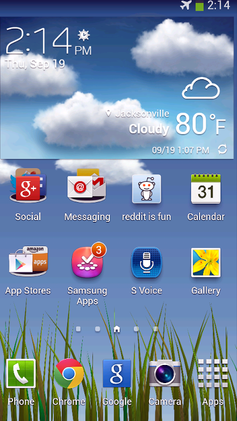
The [[Palette (computing)|colour palette]] of the user interface has been adapted to the colours of nature, prosplit-screenen (plants, forest, grass) and blue (ocean, sky), to visually represent the slogan “Inspired by Nature”. |
|
The [[Palette (computing)|colour palette]] of the user interface has been adapted to the colours of nature, prosplit-screenen (plants, forest, grass) and blue (ocean, sky), to visually represent the slogan “Inspired by Nature”, and this version of TouchWiz also utilized many [[Color gradient|colour gradients]] and [[Skeuomorph|skeuomorphic]] elements. Together, they share many aspects of the design language and aesthetic [[Frutiger Aero]]. |
|
|
|
|
This version of TouchWiz also utilized many [[Color gradient|colour gradients]]. |
|
|
|
|
|
|
Criticism has been aimed at the inability of the [[home screen]] and [[lock screen]] to work in horizontal display orientation.[{{cite web |title=I'll take my home screen in portrait, please! |url=https://www.phonedog.com/2012/06/08/i-ll-take-my-home-screen-in-portrait-please |website=phonedog.com |language=en |date=8 June 2012 |access-date=22 October 2020 |archive-date=3 September 2020 |archive-url=https://web.archive.org/web/20200903204756/https://www.phonedog.com/2012/06/08/i-ll-take-my-home-screen-in-portrait-please |url-status=live }}][{{cite web |title=It's 2012, Why Won't My Home Screen Rotate? |url=http://pocketnow.com/2012/06/08/its-2012-why-wont-my-home-screen-rotate/ |website=Pocketnow |date=8 June 2012 |access-date=22 October 2020 |archive-date=9 November 2016 |archive-url=https://web.archive.org/web/20161109052107/http://pocketnow.com/2012/06/08/its-2012-why-wont-my-home-screen-rotate |url-status=dead }}] |
|
Criticism has been aimed at the inability of the [[home screen]] and [[lock screen]] to work in horizontal display orientation.[{{cite web |title=I'll take my home screen in portrait, please! |url=https://www.phonedog.com/2012/06/08/i-ll-take-my-home-screen-in-portrait-please |website=phonedog.com |language=en |date=8 June 2012 |access-date=22 October 2020 |archive-date=3 September 2020 |archive-url=https://web.archive.org/web/20200903204756/https://www.phonedog.com/2012/06/08/i-ll-take-my-home-screen-in-portrait-please |url-status=live }}][{{cite web |title=It's 2012, Why Won't My Home Screen Rotate? |url=http://pocketnow.com/2012/06/08/its-2012-why-wont-my-home-screen-rotate/ |website=Pocketnow |date=8 June 2012 |access-date=22 October 2020 |archive-date=9 November 2016 |archive-url=https://web.archive.org/web/20161109052107/http://pocketnow.com/2012/06/08/its-2012-why-wont-my-home-screen-rotate |url-status=dead }}] |
| Line 113: |
Line 111: |
|
This update was released in 2014 to support [[Android KitKat]] (4.4). It was first seen on the [[Samsung Galaxy S5|Galaxy S5]], [[Samsung Galaxy S4 Zoom|Galaxy K Zoom]] and the [[Samsung Galaxy Note Pro 12.2|Galaxy Note Pro 12.2]]. It later appeared on the [[Samsung Galaxy Alpha|Galaxy Alpha]]. |
|
This update was released in 2014 to support [[Android KitKat]] (4.4). It was first seen on the [[Samsung Galaxy S5|Galaxy S5]], [[Samsung Galaxy S4 Zoom|Galaxy K Zoom]] and the [[Samsung Galaxy Note Pro 12.2|Galaxy Note Pro 12.2]]. It later appeared on the [[Samsung Galaxy Alpha|Galaxy Alpha]]. |
|
|
|
|
|
The home screen and settings menu were made more user-friendly with larger icons and less clutter. Also, icons in the [[context menu]]s were removed for [[minimalism#ui|minimalism]],[[http://4.bp.blogspot.com/-1IRA6fA9yYs/U4Vz146wPmI/AAAAAAAAB1w/hXq02Y3v3ug/s1600/use+buddy+photo+share+in+Galaxy+S4.png Context menu on the Galaxy S4 (2013, with icons)] {{Webarchive|url=https://web.archive.org/web/20190928180452/http://4.bp.blogspot.com/-1IRA6fA9yYs/U4Vz146wPmI/AAAAAAAAB1w/hXq02Y3v3ug/s1600/use+buddy+photo+share+in+Galaxy+S4.png |date=2019-09-28 }} and [https://i0.wp.com/www.gottabemobile.com/wp-content/uploads/2014/07/gs5-history.jpg on the Galaxy S5 (2014, without icons)] {{Webarchive|url=https://web.archive.org/web/20191006182623/https://i0.wp.com/www.gottabemobile.com/wp-content/uploads/2014/07/gs5-history.jpg |date=2019-10-06 }}] and any disabled options, where previously they would have been visible but unusable ([[Graphical widget]]), now do not show up at all. |
|
The home screen and settings menu were made more user-friendly with larger icons and less clutter. Also, many skeuomorphic elements were changed for [[flat design]] variants, icons in the [[context menu]]s were removed for [[minimalism#ui|minimalism]],[[http://4.bp.blogspot.com/-1IRA6fA9yYs/U4Vz146wPmI/AAAAAAAAB1w/hXq02Y3v3ug/s1600/use+buddy+photo+share+in+Galaxy+S4.png Context menu on the Galaxy S4 (2013, with icons)] {{Webarchive|url=https://web.archive.org/web/20190928180452/http://4.bp.blogspot.com/-1IRA6fA9yYs/U4Vz146wPmI/AAAAAAAAB1w/hXq02Y3v3ug/s1600/use+buddy+photo+share+in+Galaxy+S4.png |date=2019-09-28 }} and [https://i0.wp.com/www.gottabemobile.com/wp-content/uploads/2014/07/gs5-history.jpg on the Galaxy S5 (2014, without icons)] {{Webarchive|url=https://web.archive.org/web/20191006182623/https://i0.wp.com/www.gottabemobile.com/wp-content/uploads/2014/07/gs5-history.jpg |date=2019-10-06 }}] and any disabled options, where previously they would have been visible but unusable ([[Graphical widget]]), now do not show up at all. |
|
|
|
|
|
The ''one-handed operation mode'' available on the Galaxy S5 allows setting shortcuts for apps and contacts.[{{Cite web|date=2015-01-29|title=How to use One Handed Operation on the Galaxy S5|website=[[YouTube]] |url=https://www.youtube.com/watch?v=r4wRp2nUdCk |archive-url=https://ghostarchive.org/varchive/youtube/20211221/r4wRp2nUdCk |archive-date=2021-12-21 |url-status=live}}{{cbignore}}] A floating menu with user-specified app shortcuts has also been added.[{{Cite web|date=2014-04-15|title=How to use and customize Toolbox on the Samsung Galaxy S5|url=https://www.androidcentral.com/how-use-and-customize-toolbox-samsung-galaxy-s5|access-date=2020-09-05|website=Android Central|archive-date=2024-05-16|archive-url=https://web.archive.org/web/20240516014134/https://www.androidcentral.com/how-use-and-customize-toolbox-samsung-galaxy-s5|url-status=live}}] |
|
The ''one-handed operation mode'' available on the Galaxy S5 allows setting shortcuts for apps and contacts.[{{Cite web|date=2015-01-29|title=How to use One Handed Operation on the Galaxy S5|website=[[YouTube]] |url=https://www.youtube.com/watch?v=r4wRp2nUdCk |archive-url=https://ghostarchive.org/varchive/youtube/20211221/r4wRp2nUdCk |archive-date=2021-12-21 |url-status=live}}{{cbignore}}] A floating menu with user-specified app shortcuts has also been added.[{{Cite web|date=2014-04-15|title=How to use and customize Toolbox on the Samsung Galaxy S5|url=https://www.androidcentral.com/how-use-and-customize-toolbox-samsung-galaxy-s5|access-date=2020-09-05|website=Android Central|archive-date=2024-05-16|archive-url=https://web.archive.org/web/20240516014134/https://www.androidcentral.com/how-use-and-customize-toolbox-samsung-galaxy-s5|url-status=live}}] |

 Like
0
Like
0
 Dislike
0
Dislike
0
 Love
0
Love
0
 Funny
0
Funny
0
 Angry
0
Angry
0
 Sad
0
Sad
0
 Wow
0
Wow
0